---
title: QQ Bot
description: Connect CowAgent to QQ Bot (WebSocket long connection)
---
> Connect CowAgent via QQ Open Platform's bot API, supporting QQ direct messages, group chats (@bot), guild channel messages, and guild DMs. No public IP required — uses WebSocket long connection.
QQ Bot is created through the QQ Open Platform. It uses WebSocket long connection to receive messages and OpenAPI to send messages. No public IP or domain is required.
## 1. Create a QQ Bot
> Visit the [QQ Open Platform](https://q.qq.com), sign in with QQ. If you haven't registered, please complete [account registration](https://q.qq.com/#/register) first.
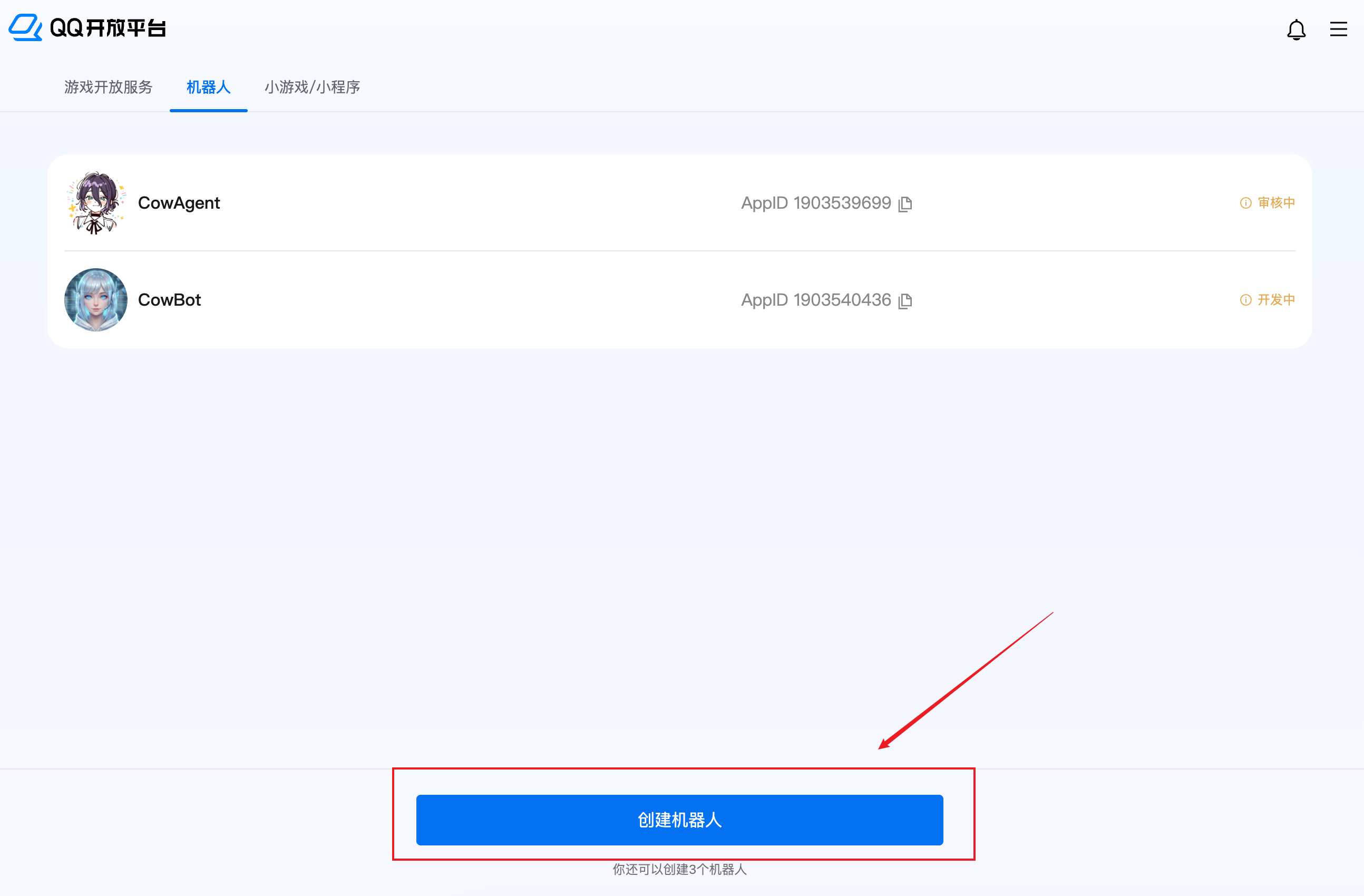
1.Go to the [QQ Open Platform - Bot List](https://q.qq.com/#/apps), and click **Create Bot**:
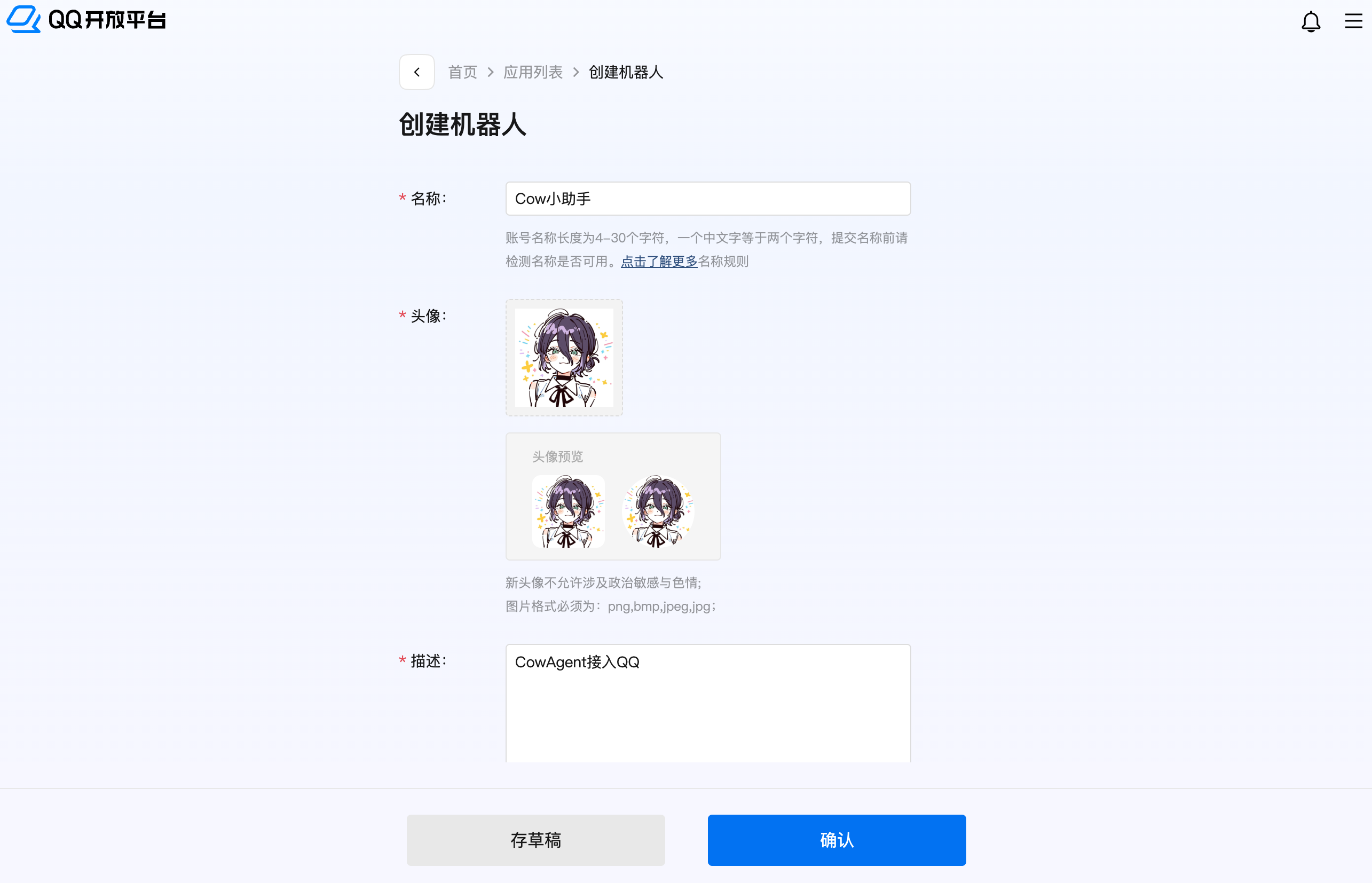
 2.Fill in the bot name, avatar, and other basic information to complete the creation:
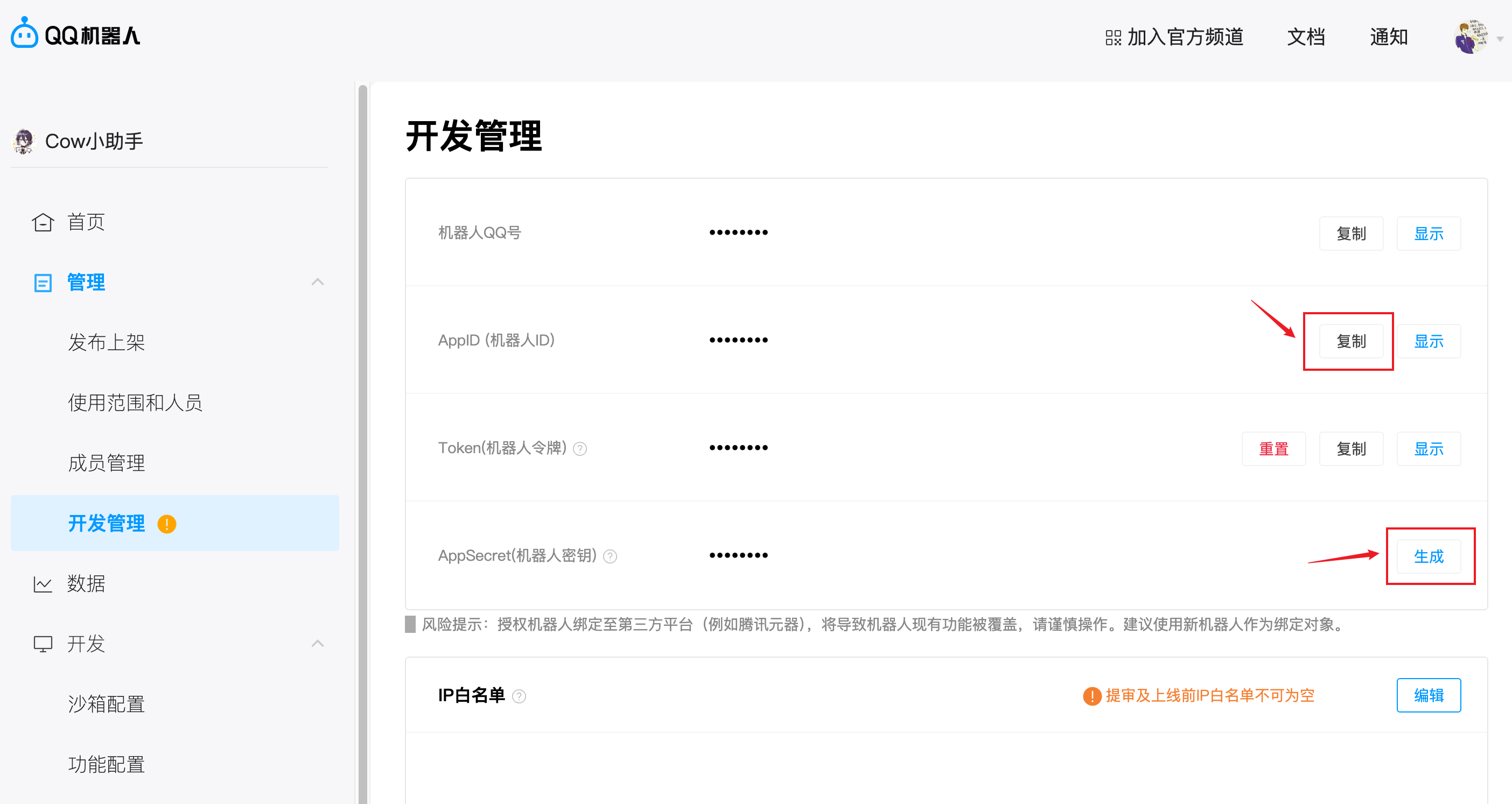
 3.Enter the bot configuration page, go to **Development Management**, and complete the following steps:
- Copy and save the **AppID** (Bot ID)
- Generate and save the **AppSecret** (Bot Secret)
3.Enter the bot configuration page, go to **Development Management**, and complete the following steps:
- Copy and save the **AppID** (Bot ID)
- Generate and save the **AppSecret** (Bot Secret)
 ## 2. Configuration and Running
### Option A: Web Console
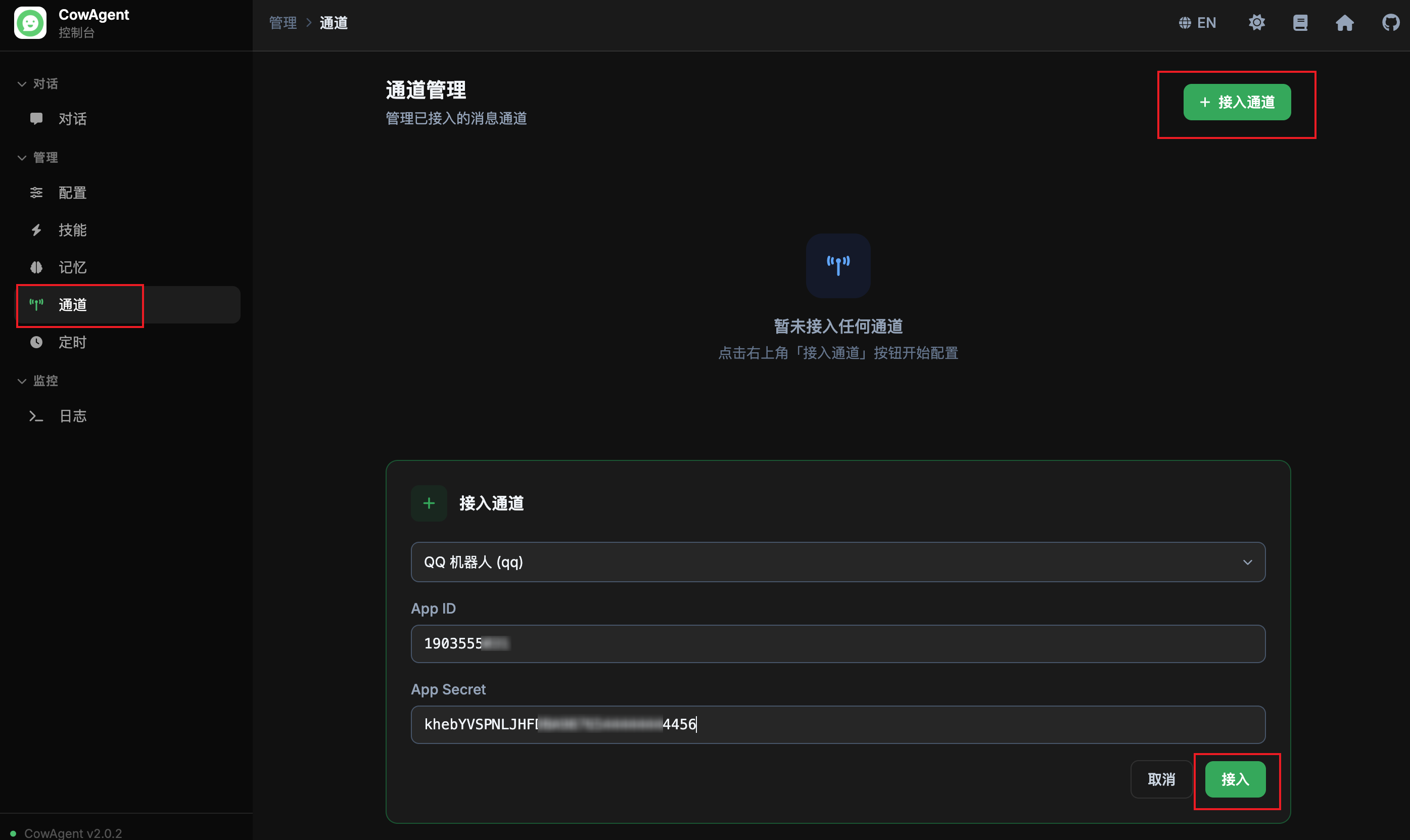
Start the program and open the Web console (local access: http://127.0.0.1:9899/). Go to the **Channels** tab, click **Connect Channel**, select **QQ Bot**, fill in the AppID and AppSecret from the previous step, and click Connect.
## 2. Configuration and Running
### Option A: Web Console
Start the program and open the Web console (local access: http://127.0.0.1:9899/). Go to the **Channels** tab, click **Connect Channel**, select **QQ Bot**, fill in the AppID and AppSecret from the previous step, and click Connect.
 ### Option B: Config File
Add the following to your `config.json`:
```json
{
"channel_type": "qq",
"qq_app_id": "YOUR_APP_ID",
"qq_app_secret": "YOUR_APP_SECRET"
}
```
| Parameter | Description |
| --- | --- |
| `qq_app_id` | AppID of the QQ Bot, found in Development Management on the open platform |
| `qq_app_secret` | AppSecret of the QQ Bot, found in Development Management on the open platform |
After configuration, start the program. The log message `[QQ] ✅ Connected successfully` indicates a successful connection.
## 3. Usage
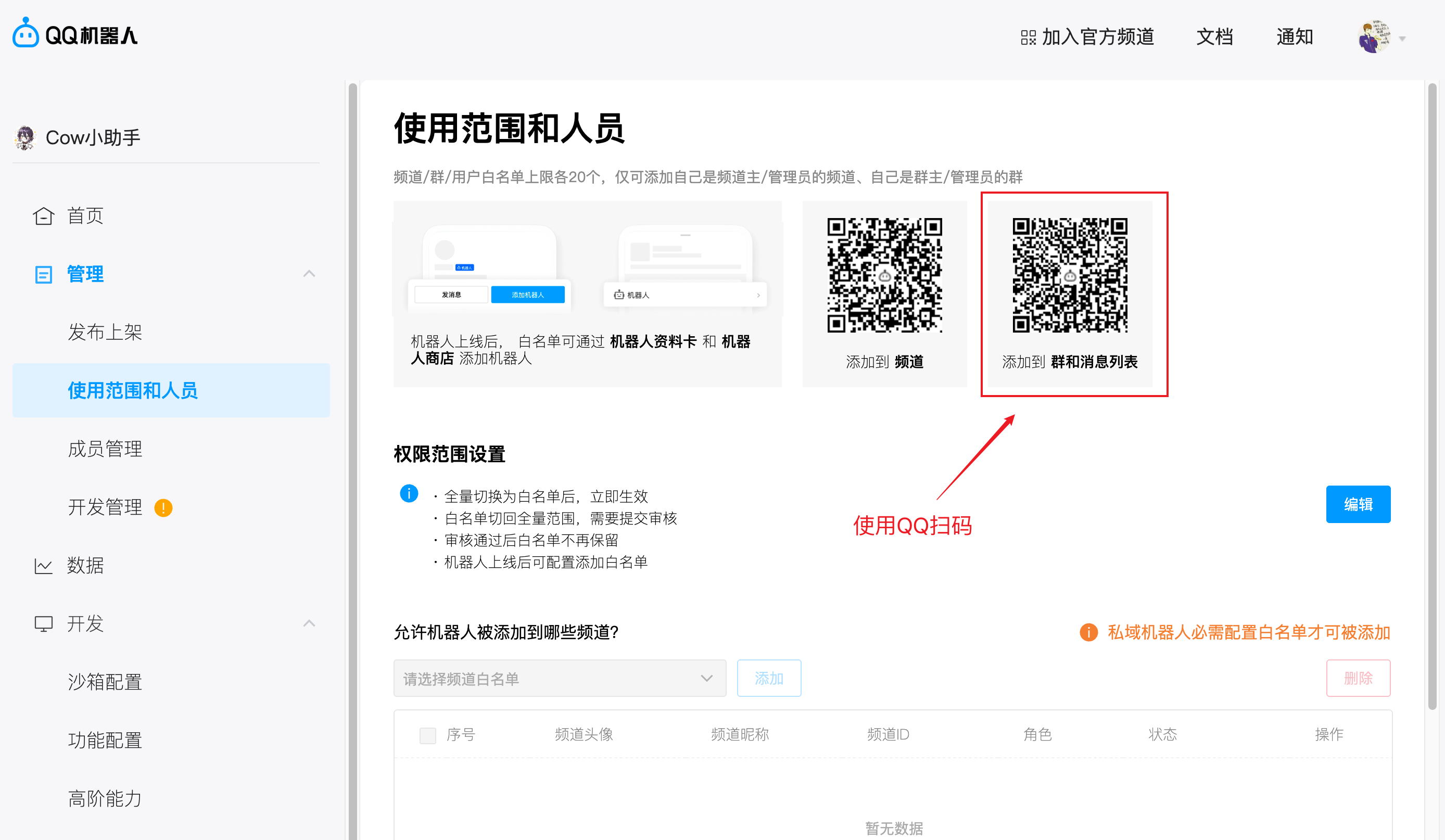
In the QQ Open Platform, go to **Management → Usage Scope & Members**, scan the "Add to group and message list" QR code with your QQ client to start chatting with the bot:
### Option B: Config File
Add the following to your `config.json`:
```json
{
"channel_type": "qq",
"qq_app_id": "YOUR_APP_ID",
"qq_app_secret": "YOUR_APP_SECRET"
}
```
| Parameter | Description |
| --- | --- |
| `qq_app_id` | AppID of the QQ Bot, found in Development Management on the open platform |
| `qq_app_secret` | AppSecret of the QQ Bot, found in Development Management on the open platform |
After configuration, start the program. The log message `[QQ] ✅ Connected successfully` indicates a successful connection.
## 3. Usage
In the QQ Open Platform, go to **Management → Usage Scope & Members**, scan the "Add to group and message list" QR code with your QQ client to start chatting with the bot:
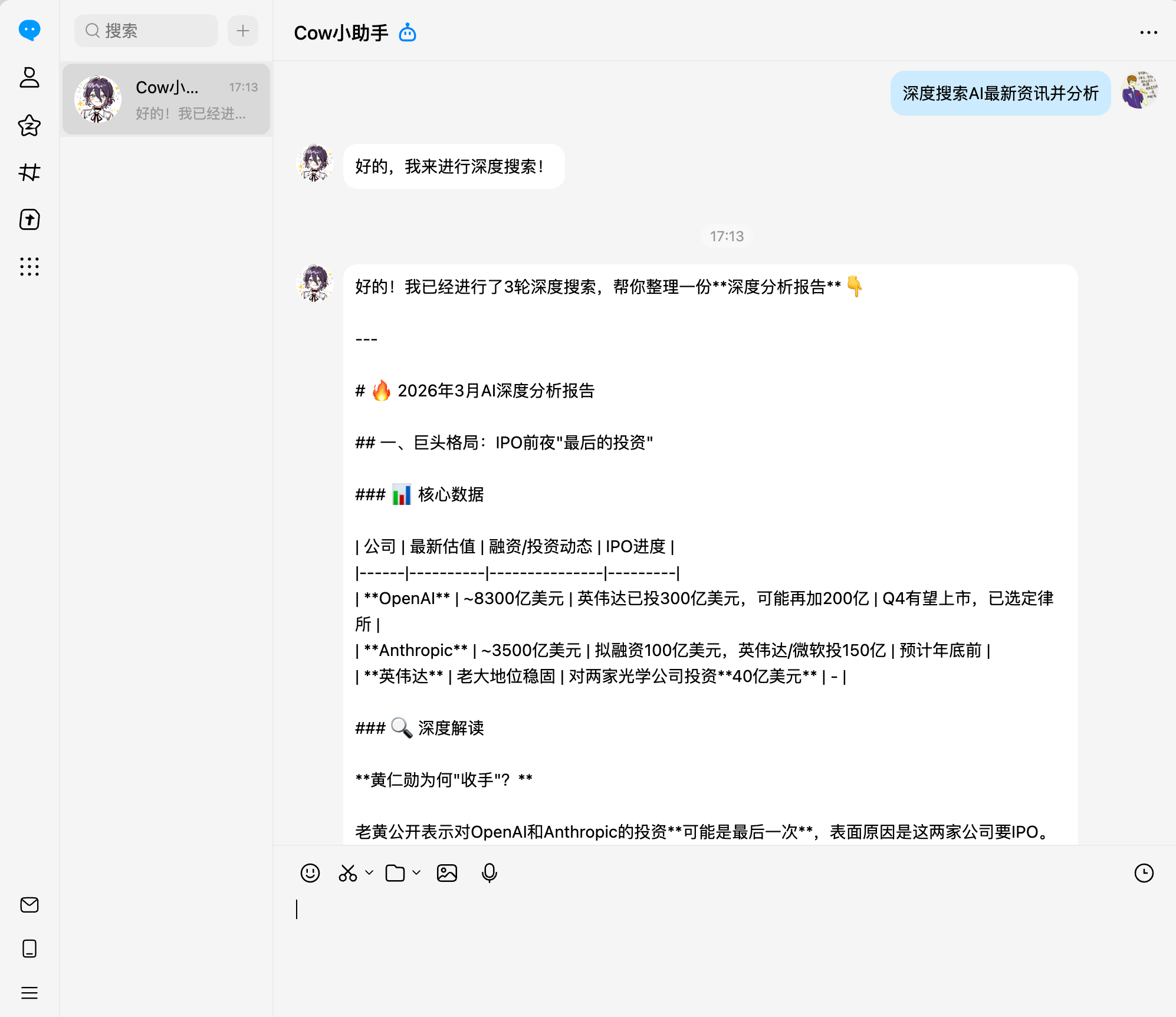
 Chat example:
 ## 4. Supported Features
> Note: To use the QQ bot in group chats and guild channels, you need to complete the publishing review and configure usage scope permissions.
| Feature | Status |
| --- | --- |
| QQ Direct Messages | ✅ |
| QQ Group Chat (@bot) | ✅ |
| Guild Channel (@bot) | ✅ |
| Guild DM | ✅ |
| Text Messages | ✅ Send & Receive |
| Image Messages | ✅ Send & Receive (group & direct) |
| File Messages | ✅ Send (group & direct) |
| Scheduled Tasks | ✅ Active push (4 per user per month) |
## 5. Notes
- **Passive message limits**: QQ direct message replies are valid for 60 minutes (max 5 replies per message); group chat replies are valid for 5 minutes.
- **Active message limits**: Both direct and group chats have a monthly limit of 4 active messages. Keep this in mind when using the scheduled tasks feature.
- **Event permissions**: By default, `GROUP_AND_C2C_EVENT` (QQ group/direct) and `PUBLIC_GUILD_MESSAGES` (guild public messages) are subscribed. Apply for additional permissions on the open platform if needed.
## 4. Supported Features
> Note: To use the QQ bot in group chats and guild channels, you need to complete the publishing review and configure usage scope permissions.
| Feature | Status |
| --- | --- |
| QQ Direct Messages | ✅ |
| QQ Group Chat (@bot) | ✅ |
| Guild Channel (@bot) | ✅ |
| Guild DM | ✅ |
| Text Messages | ✅ Send & Receive |
| Image Messages | ✅ Send & Receive (group & direct) |
| File Messages | ✅ Send (group & direct) |
| Scheduled Tasks | ✅ Active push (4 per user per month) |
## 5. Notes
- **Passive message limits**: QQ direct message replies are valid for 60 minutes (max 5 replies per message); group chat replies are valid for 5 minutes.
- **Active message limits**: Both direct and group chats have a monthly limit of 4 active messages. Keep this in mind when using the scheduled tasks feature.
- **Event permissions**: By default, `GROUP_AND_C2C_EVENT` (QQ group/direct) and `PUBLIC_GUILD_MESSAGES` (guild public messages) are subscribed. Apply for additional permissions on the open platform if needed.